
A website should never just be a static digital brochure. It needs to invite visitors to participate. When you add the right website engagement ideas, you turn passive readers into active participants. This keeps them on your page longer and helps them find exactly what they need.
But interaction must have a purpose. It should support the user journey instead of just being decorative. Let us explore practical ways to bring your site to life.
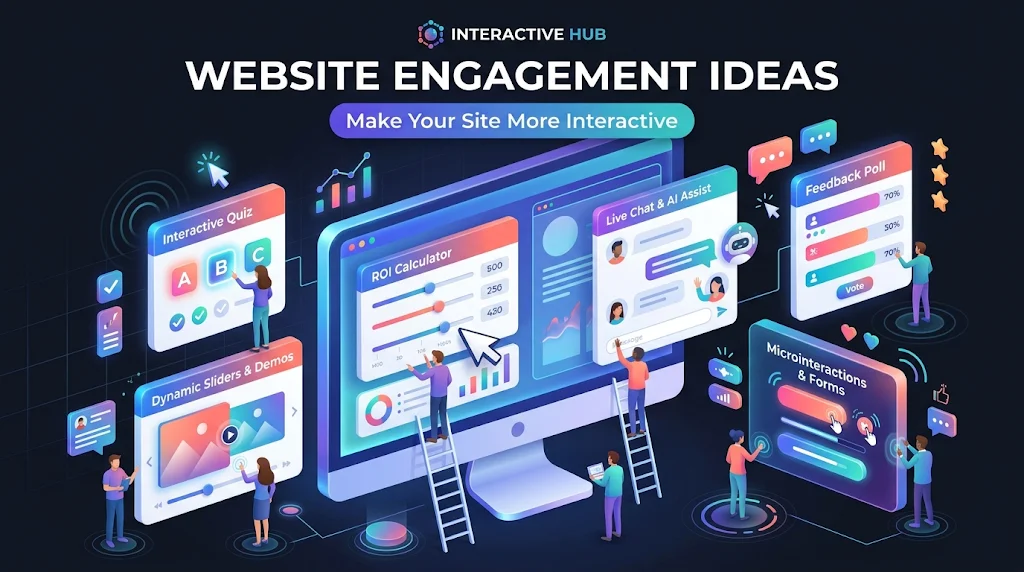
What are website engagement ideas?
Website engagement ideas are interactive elements added to a site to encourage visitors to actively participate rather than just read. These include quizzes, calculators, polls, and interactive galleries. They improve user experience by making the site more useful, keeping visitors engaged, and guiding them naturally toward a conversion.
1. Add Interactive Quizzes
People love learning about themselves. Quizzes break the ice and make the user feel involved.
Practical Examples:
- Product recommendation quiz
- Personality quiz
- Knowledge quiz
- Website service quiz
Why it works: A quiz solves a specific problem for the user while collecting valuable data for your business. For example, a skincare brand can use a “Find Your Perfect Routine” quiz. The visitor gets a personalized answer, and the business learns exactly what the customer needs.
2. Create Calculators and Useful Tools
Giving visitors immediate value is one of the best ways to improve website engagement. A useful tool saves the user from doing manual math or guessing.
Practical Examples:
- Mortgage calculator
- ROI calculator
- BMI calculator
- Savings calculator
- Pricing calculator
Why it works: These are highly practical interactive website features. When a visitor uses a return on investment tool on your site, they get a direct, personalized benefit. This gives them a strong reason to interact with your brand rather than just reading about it.
3. Use Interactive Product Demos
Letting visitors interact with a product before buying reduces purchase anxiety. When looking for interactive website examples, a furniture store using a 3D room planner is a perfect choice.
Practical Examples:
- Product configurators
- Before-and-after sliders
- Virtual previews
- Interactive service demonstrations
Why it works: When users can visualize a product in their own space or customize its features, they feel more confident. It removes the guesswork and makes the final purchase decision much easier.
Also read: Best Coding Fonts
4. Add Polls and Surveys
Polls create quick interactions with very low friction. A single click is all it takes for the user to participate.
Why it works: You can place a poll on a blog post asking readers which topic they want to read about next. This boosts website user engagement and gives you direct feedback from your audience. It makes visitors feel like their opinions matter.
5. Include Interactive Images and Galleries
Visual learners need to see details. Instead of a standard photo grid, use features that let users explore at their own pace.
Practical Examples:
- Image sliders
- Clickable hotspots
- Zoomable product images
- Interactive galleries
Why it works: This engaging website design technique turns static visuals into an exploration. A user can click a hotspot on a machine diagram to see how a specific part works, making the visual content much more useful.
6. Turn Useful Information Into Interactive Content
Information does not always need to be a long block of text. You can use interactive timelines, clickable maps, or step-by-step interfaces.
Why it works: This is a core principle of modern interactive web design. It breaks up heavy text and makes complex data much easier to digest. A clickable map of your service areas is much more engaging than a plain list of cities.
7. Add Games and Playable Experiences
Simple browser games can encourage visitors to stay and interact. You do not need to build a massive video game to see results.
Practical Examples:
- Puzzle games
- Word games
- Memory games
- Trivia
- Mini challenges
Why it works: Gamification triggers a sense of achievement and keeps users entertained. Even a simple browser-based activity can give visitors a reason to stay longer. For example, websites can offer free online jigsaw puzzles as a lightweight interactive experience that visitors can start directly in their browser. Fun interactive websites often use these simple games to build a positive association with their brand.
8. Add Interactive Forms
A basic contact form is boring. Try multi-step forms or quote calculators instead.
Practical Examples:
- Multi-step forms
- Quote calculators
- Service selection forms
- Appointment forms
Why it works: Breaking a long form into smaller steps makes it feel less overwhelming. Adding a progress bar motivates users to finish. According to the Nielsen Norman Group, revealing information gradually reduces cognitive load and improves form completion rates.
9. Use Personalized Recommendations
Act like a digital salesperson. If a visitor is looking at running shoes, show them related socks or a matching jacket.
Why it works: This reduces decision fatigue and guides them toward a purchase. According to HubSpot, personalized recommendations can significantly boost conversion rates. It is one of the most effective website engagement strategies for e-commerce stores.
10. Add Interactive FAQs
Instead of a massive wall of text, use expandable accordion menus for your frequently asked questions.
Why it works: Accordions keep your page clean and organized. Users can click to reveal only the answers they need. It makes finding information fast and frustration-free, which is a key part of good user experience.
11. Create Interactive Comparisons
Buyers want to justify their choices. A simple comparison table or an interactive selector helps them weigh options easily.
| Feature | Basic Static Page | Interactive Comparison Page |
|---|---|---|
| Data Presentation | Long paragraphs of text | Clean, side-by-side tables |
| User Action | Reading and scrolling | Clicking, filtering, and selecting |
| Decision Speed | Slow and confusing | Fast and clear |
| Mobile Experience | Hard to read on small screens | Easy to swipe and tap |
Why it works: When users can easily see the differences between pricing plans or service packages, they make decisions faster. It removes the mental effort of comparing items in their head.
12. Add Clear Calls to Action
Interaction without direction is useless. Every interactive element should lead to a clear next step.
Practical Examples:
- Get a quote
- Book a consultation
- Try a tool
- Start a quiz
- View products
Why it works: The goal of how to make a website interactive is to move the visitor forward in their journey. A clear call to action tells them exactly what to do next, turning their engagement into a measurable result.
How to Choose the Right Interactive Features
Not every feature fits every site. Here is how to decide which interactive content for websites makes sense for your goals.
Match the feature to your goal
- Generate leads: Use quizzes, calculators, and guided forms.
- Sell products: Use configurators, comparisons, and virtual demos.
- Educate visitors: Use interactive diagrams, timelines, and useful tools.
- Increase time on site: Use games, polls, and interactive galleries.
- Improve conversions: Use personalized recommendations and multi-step forms.
Keep the experience simple
Do not add interactive elements simply because they look impressive. If a feature confuses the user or adds unnecessary steps, it will hurt your conversion rate. Always prioritize clarity over cleverness.
Make everything mobile-friendly
Interactive elements must work perfectly on phones and tablets. A complex hover effect might look great on a desktop, but it will fail on a touchscreen. Always test your interactive website ideas on mobile devices before launching.
Do not sacrifice speed
Large scripts, heavy animations, and poorly optimized images will slow down your site. A slow site will drive visitors away, no matter how fun the interactive features are. Always test your page speed using tools like Google PageSpeed Insights to ensure your site remains fast and responsive.
Final Thoughts
A more interactive website does not require complicated technology. A simple quiz, a helpful calculator, or a clean comparison tool can completely change how visitors experience your brand. The right features make your site more useful, engaging, and easier to navigate.
If your website feels more like a digital brochure than an experience, it may be time to rethink the design. Our team specializes in Wix web design that focuses on real user experiences. Explore our Wix website design services to see how we build engaging platforms that convert.
Need more traffic to your new interactive site? Check out our Wix SEO services to rank higher and attract the right audience. When you are ready to upgrade your online presence, contact us for a free quote today.